Backup or Restore Apps Using Scarlet iOS

How to Backup or Restore Apps Using Scarlet iOS

Scarlet iOS allows you to easily back and restore your apps. There are two Methods (Normal and Stealth)  for restoring your apps using Scarlet. Let’s learn how to Backup or Restore Apps Using Scarlet iOS.

Normal Method of Backup/Restoring apps using Scarlet

Here are simplified steps for using the Backup/Restore feature in Scarlet:
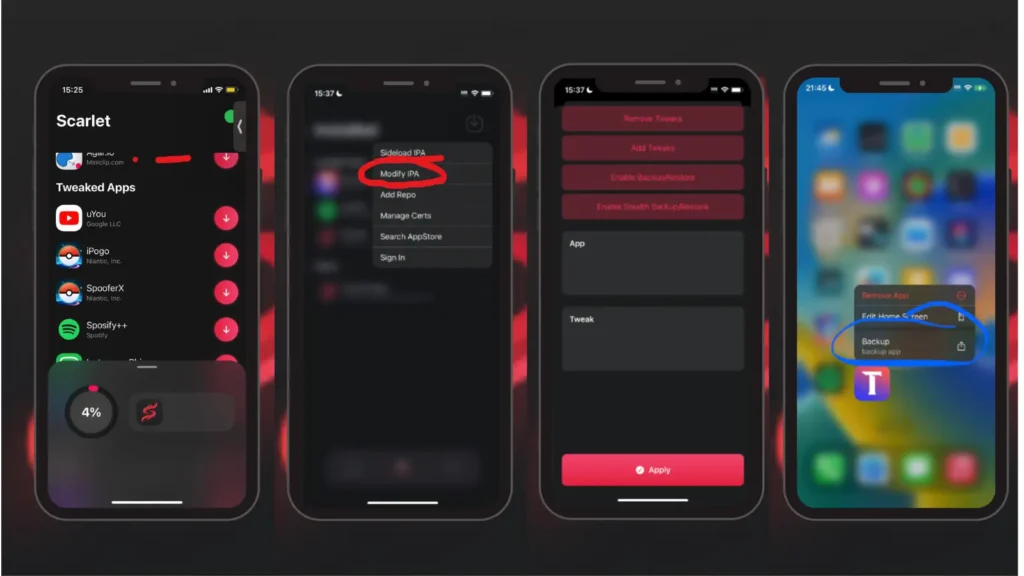
Normal Method of Backup in Scarlet iOS

Enable Backup/Restore:

  • Open Scarlet and go to the “Modify IPA” menu.
  • Select “Enable Backup/Restore” from the options.
  • Click on “Apply” at the bottom to activate this feature.


Backing Up an App

  • After enabling Backup/Restore, go to your device’s home screen.
  • Tap on the app icon that you want to back up.
  • Select “Backup” from the options that appear.
  • Choose where you want to save the “.scripa” backup file on your device.

Restoring an App

  • To restore a backed-up app, locate the “.scripa” backup file that you previously saved.
  • Use the normal Scarlet sideload button to install the app from the backup file.
  • The app will be installed with all its contents restored.

These steps allow you to easily back up and restore apps using Scarlet. Once the Backup/Restore feature is enabled, you can protect your app data and restore it whenever needed using the “.scripa” backup files generated by Scarlet. Restoring an app from backup reinstalls it along with all its saved data and settings.

Backup or Restore Using Stealth in Scarlet iOS

Here are simplified steps for using the Stealth Backup/Restore feature in Scarlet, especially useful if the normal Backup/Restore method doesn’t work for your app:
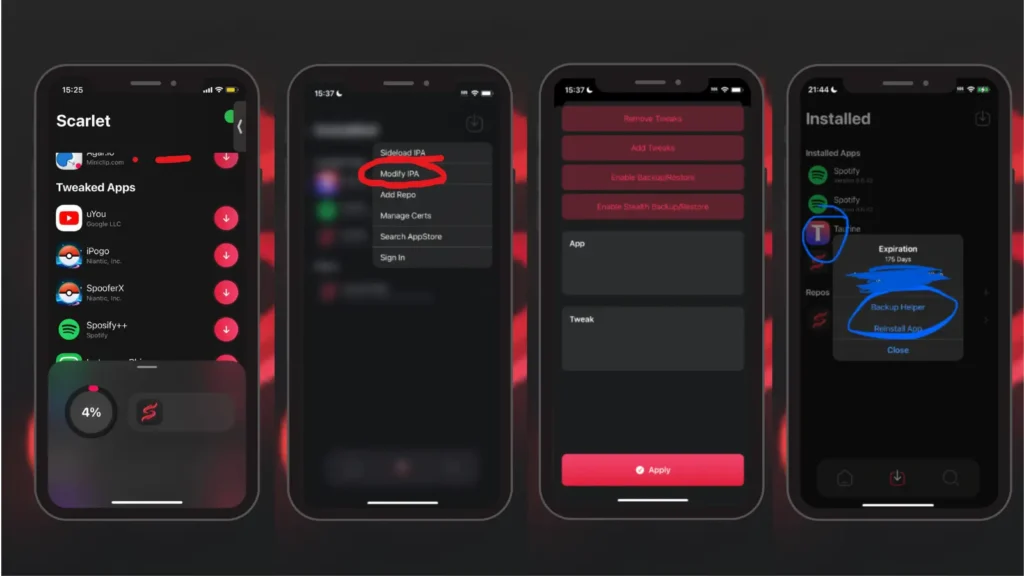
Stealth Method of Backup in Scarlet iOS

Enable Stealth Backup/Restore

  • Open Scarlet and navigate to the “Modify IPA” menu.
  • Select “Enable Stealth Backup/Restore” from the available options.
  • Click on “Apply” at the bottom to activate this feature.

Backing Up and Restoring with Stealth Mode

  • After enabling Stealth Backup/Restore, go to the “Scarlet installed” section within the app.
  • Find and click on the icon of the app you want to back up.
  • Select “Backup Helper” from the options. This will install an additional app over the current one, which includes the backup and restore functionality.
  • Don’t worry, this process won’t delete any of your app progress or data.
  • Now, go back to your device’s home screen and tap on the app icon you want to work with.
  • You’ll see options to “Backup” or “Restore” within this app, allowing you to manage your app’s data easily.

These steps enable you to use the Stealth Backup/Restore feature in Scarlet if the normal method doesn’t work for a particular app. By installing a helper app over the existing one, you gain access to additional backup and restore capabilities without affecting your app’s progress or content.
Similar Posts

  • Top Jailbreak Tweaks Compatible with Scarlet iOS

    Jailbreaking an iOS device brings a wealth of alternatives that enable you to gain access to customized tweaks to optimize performance and personalize numerous features. Using Scarlet iOS as an alternative third-party installer for jailbreaking your device can provide you with the accessibility of the best tweaks to level up your iOS experience. This article…

  • How to Install Apps on iPhone without the App Store

    Are you looking for ways to install applications on an iPhone without using the App Store? Let’s install apps on iPhone without the app store. Exploring alternative methods to install applications on an iPhone without relying solely on the App Store can provide users with additional flexibility and options. The App Store serves as the…

  • How To Update Scarlet iOS 2024

    Scarlet iOS fans, are you ready to elevate your digital experience to the next level? The ever-evolving world of Scarlet iOS continually offers exciting features and improvements, and staying updated is key to enjoying the full spectrum of enhancements. So, Let’s learn how to update Scarlet iOS. If you’ve been using it but find the…

  • Can You Use Scarlet iOS on Android? Expert Review

    In the ever-evolving realm of technology, new applications frequently capture our attention, promising unique and innovative experiences. One such intriguing platform is the Scarlet iOS app, renowned for its distinctive features and stellar performance.  However, a burning question often arises among tech enthusiasts: Can you use Scarlet iOS on Android devices? In this article, we…

  • What is ScarletCloud and How it Works?

    ScarletCloud is a service that lets you install apps on your iPhone or iPad using your computer (whether it’s running Linux, Mac, or Windows) and a valid Apple ID login. This method doesn’t require jailbreaking your device. Here’s more information about ScarletCloud: How ScarletCloud works (Installation Process) ScarletCloud works by connecting your device to your…

Leave a Reply

Your email address will not be published. Required fields are marked *